
Download Zoho Docs – Cloud Storage, Online Document Management
Overview
Zoho Docs es un sistema de gestión de documentos basado en la nube diseñado para centralizar el almacenamiento de archivos y optimizar la colaboración entre equipos e individuos. La plataforma permite a los usuarios almacenar, acceder, crear, editar y compartir de forma segura varios tipos de archivos —incluidos documentos, hojas de cálculo, presentaciones, imágenes, música, videos y archivos comprimidos— en cualquier momento y desde cualquier ubicación con conexión a internet. Sirve como un espacio de trabajo unificado donde los usuarios pueden gestionar todos sus activos digitales desde una única interfaz.
Diseñado tanto para uso personal como profesional, Zoho Docs soporta la colaboración en tiempo real, lo que lo hace ideal para equipos remotos, freelancers, educadores y pequeñas y medianas empresas. El sistema permite a los usuarios compartir archivos con colegas en diferentes zonas horarias, facilitando un trabajo en equipo sin barreras geográficas. También facilita la organización eficiente de archivos mediante funciones como archivado, adjuntos y la integración directa de correo electrónico para compartir.
Como parte del ecosistema Zoho, el software enfatiza la accesibilidad y la integración en múltiples dispositivos. Aunque el desarrollador no proporcionó detalles adicionales sobre los antecedentes de la empresa, Zoho Docs se posiciona como una solución segura y escalable para gestionar contenido digital en un entorno centralizado. Su valor principal radica en simplificar los flujos de trabajo de documentos y mejorar la productividad del equipo mediante acceso unificado y herramientas colaborativas.
Key Features & Capabilities
- Centralized File Storage – Store all file types in one secure, accessible location, reducing the need for scattered local or third-party storage.
- Real-Time Collaboration – Multiple users can work on the same document simultaneously, with changes reflected instantly across all connected devices.
- Multi-Format Support – Create, edit, and view files in formats such as PDF, ZIP, DOCX, XLSX, PPTX, and more, including multimedia files.
- Secure Sharing & Permissions – Share files with individuals or groups using customizable access levels, ensuring data remains protected.
- File Management Tools – Perform actions like archiving, importing, exporting, attaching files, and sending via email directly from the platform.
- Cross-Platform Accessibility – Access Zoho Docs via web browsers, desktop apps, and mobile devices, including Windows, Mac, Linux, Android, and iOS.
These capabilities empower users to manage complex document workflows efficiently. For example, a marketing team can co-edit a campaign presentation while team members in different regions contribute in real time. Similarly, a student can upload a research paper, attach supporting data, and share it with professors for feedback—all within a single interface. The integration of file management and collaboration tools reduces workflow friction and supports dynamic, location-independent work environments.
User Interface, Workflow & Performance
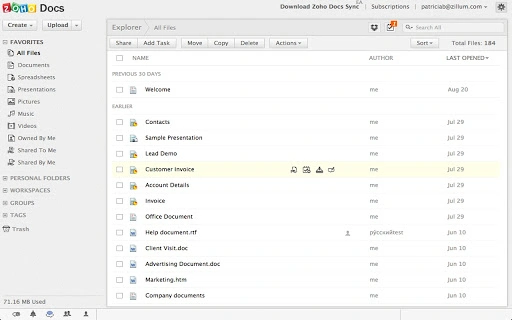
The user interface of Zoho Docs is designed around simplicity and functionality, offering a clean layout that prioritizes file navigation and quick access to core tools. Users can browse, search, and organize files using folders, tags, or file type filters, enabling efficient content retrieval. Navigation is intuitive, with a sidebar menu that provides access to recent files, shared items, and storage usage.
Workflow efficiency is enhanced by the ability to perform common tasks—such as uploading, sharing, editing, and exporting—without leaving the main interface. The platform supports drag-and-drop file uploads and integrates seamlessly with email for direct sharing. While the developer did not specify resource usage details, the software is designed to operate smoothly within standard web browsers and desktop applications, minimizing performance impact on local systems.
Stability is maintained through cloud-based processing, which reduces reliance on local hardware. However, actual performance may vary depending on internet speed and server load. The software relies on consistent connectivity, and offline functionality is not specified. Users should expect responsive behavior when connected, but performance under low-bandwidth conditions may be limited.
Compatibility & System Requirements
Zoho Docs is compatible with a wide range of operating systems, including Windows, Mac, Linux, Android, and iOS. This broad support ensures that users can access their files regardless of their device preference. The desktop application has a file size of 50 MB, making it lightweight and quick to install.
Exact system requirements were not listed by the developer. However, given the software’s cloud-first architecture, it is likely optimized for modern systems with standard internet connectivity and sufficient RAM for web-based operations. The application does not require high-end hardware, as most processing occurs on remote servers. Installation is straightforward, and the software is designed to run efficiently on both older and newer devices.
Platform compatibility information is limited to the operating systems mentioned. No specific hardware specifications or version dependencies were provided. Users should ensure they have an active internet connection and a supported browser or app version to access full functionality.
Pros and Cons
Pros
- Secure, centralized storage for all file types
- Real-time collaboration across multiple users and regions
- Supports a wide variety of file formats, including PDF and ZIP
- Available on Windows, Mac, Linux, Android, and iOS
- Free to use with no cost barrier to entry
- Intuitive interface with efficient file management tools
Cons
- Offline functionality not confirmed
- No detailed system requirements provided
- Performance may depend on internet connection quality
- Advanced features may require additional Zoho services
- Limited customization options for interface layout
FAQ Section
Is Zoho Docs compatible with Windows, Mac, and Linux?
Yes, Zoho Docs supports Windows, Mac, and Linux operating systems through its desktop application and web interface.
Can I use Zoho Docs without an internet connection?
While the software is primarily cloud-based, offline access details were not specified. Users are advised to maintain an active internet connection for full functionality.
Is Zoho Docs safe and secure?
Zoho Docs is designed to provide secure file storage and sharing. Data is protected through encryption and access controls, though specific security protocols were not detailed.
Does Zoho Docs offer automatic updates?
Automatic updates are likely enabled through the desktop application, but the developer did not provide confirmation on update mechanisms.
What license type does Zoho Docs use?
Zoho Docs is offered as a free software tool with no cost for basic usage. The license type was not explicitly stated.
Final Thoughts + CTA
Zoho Docs stands out as a reliable, free solution for individuals and teams seeking a centralized, collaborative document management system. Its ability to support real-time editing, cross-platform access, and secure file sharing makes it a practical choice for remote work and project collaboration. While some technical details such as system requirements and offline capabilities remain unspecified, the platform delivers a solid user experience across devices.
Users who prioritize accessibility, simplicity, and seamless teamwork will benefit most from Zoho Docs. Whether managing personal files or coordinating with a distributed team, this tool streamlines workflows and enhances productivity. For those looking for a free, cloud-based document management system with broad compatibility, Zoho Docs is a strong contender.
Download Zoho Docs now







